
How to Implement SAST for Mobile Apps Without Losing Your Mind
The Mobile App Security Crisis You Can’t Ignore
SAST for mobile apps is a method of automatically scanning your mobile application’s source code — or compiled binaries — for security vulnerabilities before the app ever runs.
Quick answer: What does SAST for mobile apps do?
| What | How | Why it matters |
|---|---|---|
| Scans source code or binaries statically | No execution needed | Catches bugs early, before they ship |
| Detects hardcoded secrets, insecure storage, weak crypto | Automated rule-based + taint analysis | Prevents data breaches and compliance failures |
| Supports Android (Java, Kotlin) and iOS (Swift, Objective-C) | Platform-aware rulesets | Covers mobile-specific attack surfaces |
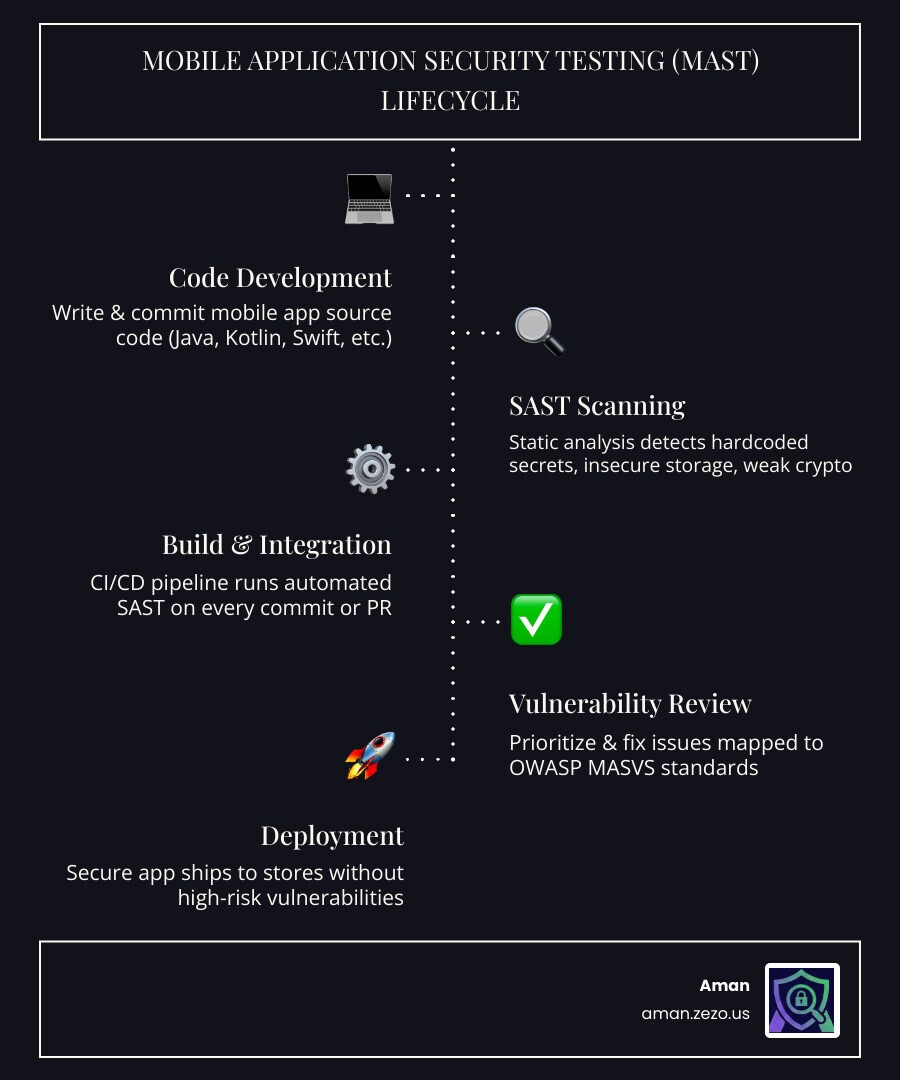
| Integrates into CI/CD pipelines | Runs on every commit or pull request | Shifts security left into development |
| Maps findings to OWASP MASVS | Compliance-ready reporting | Simplifies audits and store submissions |
Here’s a number that should make any developer uncomfortable: in 2022, over 255 billion mobile apps were downloaded worldwide. And according to a large-scale survey, three in four of those apps contain at least one moderate security vulnerability.
That’s not a niche problem. That’s the industry norm.
The traditional approach to mobile security — running a manual audit close to launch — simply doesn’t scale. By the time a vulnerability is found late in the release cycle, fixing it costs far more time, money, and reputation than catching it on day one.
That’s exactly the problem SAST solves. Instead of waiting until the app is running in production, SAST tools analyze your code as you write it, flagging risky patterns like hardcoded API keys, insecure data storage, or broken authentication logic — automatically, continuously, and without executing a single line.
But here’s the honest truth: mobile SAST is harder than web SAST. Platform fragmentation, cross-platform frameworks like Xamarin or Flutter, compressed .NET libraries, and language diversity across Android and iOS all create real technical hurdles. Even combining multiple SAST tools still leaves 70.9% of vulnerabilities undetected according to research — which means tool selection and configuration matter enormously.
This guide walks you through how to implement SAST for mobile apps effectively, which tools actually work, and how to integrate them without grinding your development pipeline to a halt.
What is SAST for Mobile Apps and Why Does It Matter?
At its core, sast for mobile apps (Static Application Security Testing) is like having a highly pedantic security expert look over your shoulder while you code. It examines the “blueprints” of your application—the source code, configuration files, and even compiled binaries—without actually running the program.
In mobile, this is a massive advantage. Think about the scale: 2022 saw over a quarter of a trillion (255 billion) mobile app downloads worldwide, and that number grew even further in 2023. With billions of users carrying sensitive data, social media access, and financial credentials in their pockets, the stakes couldn’t be higher.
Why Mobile is a Different Beast
If you’ve done SAST for web apps, you might think you’re prepared. You aren’t. Mobile apps introduce unique challenges:
- Platform Fragmentation: Android is notoriously open, leading to thousands of device types and varying OS versions. iOS is a walled garden with its own strict set of rules. A vulnerability on one might not exist on the other.
- Data Privacy at the Edge: Unlike web apps where most data lives on a secure server, mobile apps often store data locally. Sast for mobile apps is essential for catching insecure local storage or “leaky” logging that could expose user info.
- Hardcoded Secrets: It is shockingly common to find API keys, private tokens, or even hardcoded AES keys buried in mobile binaries. Static analysis is the front line for sniffing these out before a hacker does.
- Binary Analysis: Sometimes we don’t have the source code (like when checking third-party SDKs). We need tools that can decompile an APK or IPA file and analyze the underlying logic.
By following frameworks like the OWASP Mobile Security Testing Guide, we can use SAST to ensure our apps meet the highest industry standards before they ever hit the App Store or Google Play.
Navigating the Mobile Security Toolset: SAST, DAST, and SCA
We often get asked: “If I have SAST, do I really need anything else?” The short answer is yes. To build a truly secure mobile app, you need a “defense in depth” strategy.
| Method | What it Scans | When it Runs | Best For |
|---|---|---|---|
| SAST | Source Code / Binary | Development | Finding hardcoded keys, logic flaws, and insecure APIs. |
| DAST | Running App | Testing/Staging | Finding runtime issues, network leaks, and session hijacking. |
| SCA | Dependencies | Continuous | Finding known vulnerabilities (CVEs) in third-party libraries. |
| IAST | Running App + Code | Testing | Blending static and dynamic analysis for high-accuracy results. |
The Role of SCA and DAST
While sast for mobile apps looks at what you wrote, Software Composition Analysis (SCA) looks at what you borrowed. Remember the ParkMobile breach? That was caused by a third-party software vulnerability that compromised the data of 21 million users. SCA helps prevent this by checking your libraries against databases of known flaws.
Dynamic Application Security Testing (DAST), on the other hand, watches the app in motion. It might catch a certificate pinning bypass that a static scan missed. For a deeper dive into how these fit into a broader security strategy, check out our Infrastructure Scanning Guide: Risk Mitigation.
The goal isn’t to pick one tool; it’s to create a pipeline where they work together. SAST catches the “low-hanging fruit” and architectural flaws early, while DAST and manual penetration testing handle the complex runtime scenarios.
Overcoming Technical Hurdles in Mobile Static Analysis
If SAST were easy, every app would be secure. The reality is that mobile code is often intentionally difficult to read.
Developers use obfuscation to protect their intellectual property, which makes it harder for reverse engineers—and SAST tools—to understand the logic. Then there’s the issue of decompilation. To scan an app binary, the tool must effectively “un-bake” the cake to see the ingredients.
Taint Analysis: Following the Breadcrumbs
One of the most powerful features in modern sast for mobile apps is taint analysis. This technique tracks “tainted” data (like user input from a text field) as it moves through the app. If that tainted data reaches a “sink” (like a database query or a file write) without being cleaned, the tool flags a potential injection vulnerability.
We also have to worry about lower-level issues. Apps written in native languages need to follow C programming best practices to avoid classic blunders like memory leaks and buffer overflows. While Java and Swift handle a lot of memory management for us, native components remain a high-risk area for exploits.
Language Support in SAST for Mobile Apps
Your SAST tool is only as good as the languages it speaks. For Android, it must fluently handle Java and Kotlin. For iOS, it needs to understand Swift and the legacy but still prevalent Objective-C.
The challenge grows with cross-platform frameworks. If you’re using Dart (Flutter) or JavaScript (React Native), your tool needs specialized rulesets to understand how those frameworks interact with the native mobile OS. Issues like avoiding Objective-C memory leaks are platform-specific and require a tool with deep mobile-specific “smarts.”
Handling Complex Frameworks: The Xamarin Challenge
Xamarin is a particularly tough nut to crack. It allows developers to write apps in C# that run on Android and iOS. However, the way it packages code—often using compressed .NET libraries—can baffle standard scanners.
In a Xamarin reverse engineering scenario, security researchers often have to use specialized tools like the xamarin-decompress tool to extract DLL files from an APK. Once decompressed from their LZ4 format, these files can be analyzed for hardcoded keys and logic flaws. If your SAST tool doesn’t support this level of depth, it will miss everything inside those compressed assemblies.
Best Practices for Integrating SAST into Your CI/CD Pipeline
The secret to successful sast for mobile apps implementation is making it invisible. If a security scan takes three hours and produces 500 false positives, your developers will find a way to disable it.
We recommend a “Shift-Left” approach. This means moving security testing as early as possible in the development lifecycle.
1. Automate Everything
Integrate your SAST scans directly into your CI/CD pipeline. Whether you use GitHub Actions, Jenkins, or mobile-specific platforms like Bitrise, the scan should trigger automatically on every pull request.
2. Set Quality Gates
Don’t just report vulnerabilities—act on them. Define “Quality Gates” that prevent code from being merged if it contains “Critical” or “High” severity issues. This ensures that security isn’t an afterthought; it’s a requirement for shipping.
3. Minimize Developer Friction
False positives are the enemy of productivity. Some tools can be tuned to cut false positives by up to 80%. When a tool like Aman provides instant AI explanations and fix suggestions, it turns a “security problem” into a “quick fix” for the developer.
4. Align with Standards
Use the OWASP MASVS standards as your North Star. By mapping your SAST findings to these industry-recognized levels (L1, L2, and R), you ensure your app is prepared for ISO 27001 compliance or PCI DSS standards if you’re handling payments.
Automating SAST for Mobile Apps for Continuous Security
In a high-velocity environment, the commit phase is critical. Ideally, a basic security scan should provide feedback within minutes.
By using API integrations, you can automatically send findings to your team’s ticketing system (like Jira) or messaging apps (like Slack). This keeps the feedback loop tight and ensures that vulnerabilities are treated with the same urgency as functional bugs.
Frequently Asked Questions about Mobile SAST
How does SAST differ from DAST in mobile testing?
Think of SAST as checking the car’s engine while it’s turned off and disassembled on the shop floor. You’re looking for cracks in the block or loose bolts. DAST is like taking the car for a test drive. You’re checking if the brakes squeal at high speeds or if the headlights flicker when you hit a bump. You need both to ensure the car is safe.
Can SAST detect hardcoded API keys in mobile binaries?
Yes! This is one of SAST’s strongest suits. By scanning the strings and configuration files within an APK or IPA, SAST tools can identify patterns that look like AWS keys, Firebase tokens, or private encryption keys.
Does SAST for mobile apps support cross-platform frameworks like Flutter?
It depends on the tool. Many general-purpose SAST tools struggle with Flutter’s Dart code or React Native’s bridge. However, specialized mobile security platforms are increasingly adding support for these frameworks to ensure that the “write once, run anywhere” philosophy doesn’t become “vulnerable once, exploited everywhere.”
Conclusion
Implementing sast for mobile apps doesn’t have to be a headache. By starting early, choosing tools that understand the unique quirks of Android and iOS, and automating the process within your CI/CD pipeline, you can build apps that are secure by design.
At Aman, we believe security should be fast, comprehensive, and accessible. Our platform offers AI-powered automated penetration testing and SAST analysis that integrates 50+ scanners to give you a complete picture of your security posture. With instant AI explanations and fix suggestions, we help you bridge the gap between finding a vulnerability and fixing it—all for Free.
Don’t let your mobile app become another statistic. Secure your apps with Aman tools today and start shifting your security left without losing your mind.
Secure Your Apps with Aman
Put these mitigation steps into practice. Get professional-grade vulnerability detection in one place.
Launch Your First Scan Now