Scanning for Trouble: A Guide to Web App Vulnerability Tools
Scanning for Trouble: A Guide to Web App Vulnerability Tools
Why a Web App Vulnerability Scanner Is Essential for Modern Application Security
A web app vulnerability scanner is an automated tool that tests your web applications for security weaknesses — things like SQL injection, cross-site scripting (XSS), broken access control, and misconfigurations — before attackers find them first.
Here are the top web app vulnerability scanners worth knowing:
| Tool | Best For | Pricing |
|---|---|---|
| Burp Suite Pro | Manual + automated pentesting | Commercial |
| Invicti (Netsparker) | Enterprise, proof-based scanning | Commercial |
| Acunetix | OWASP Top 10, DevSecOps integration | Commercial |
| Snyk API & Web | Dev-first DAST, AI-generated code | Free plan available |
| OWASP ZAP | Open-source DAST, CI/CD pipelines | Free |
| Wapiti | Command-line black-box auditing | Free |
| Nikto | Quick server-level checks | Free |
The numbers make the risk hard to ignore. Studies suggest roughly 70% of web applications have serious security gaps — including missing WAF protection and weak encryption. Attackers know this. And with AI-generated code now being embedded into production apps at speed, the attack surface is growing faster than most teams can review manually.
Automated scanning isn’t a nice-to-have anymore. It’s the baseline.
I’m Zezo Hafez, an IT Manager and AWS/Azure-certified cloud architect with over 15 years of web development experience — I’ve worked hands-on with web app vulnerability scanners across single, poly, multi, and hybrid cloud environments. In this guide, I’ll walk you through the tools that actually matter, so you can make a confident choice for your stack.
What is a Web App Vulnerability Scanner and How Does it Work?
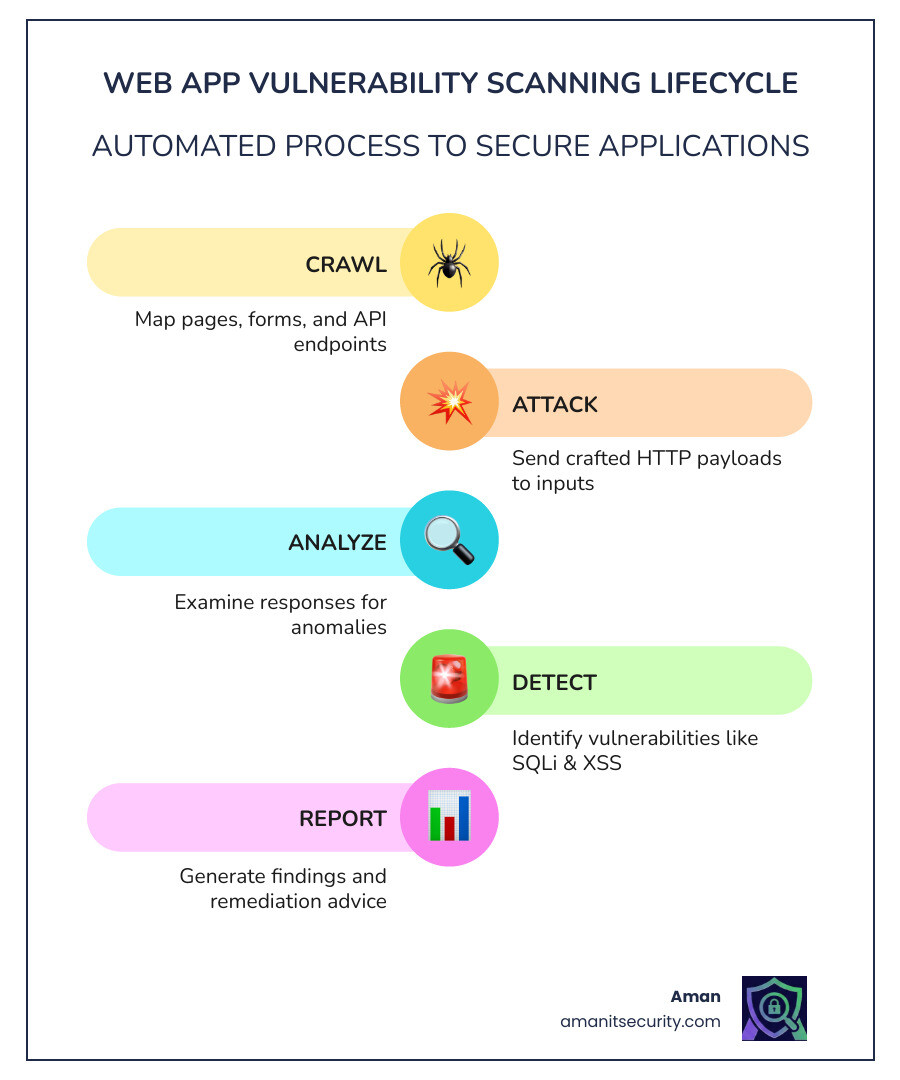
At its core, a web app vulnerability scanner acts like a friendly neighborhood hacker. It performs what we call “black-box testing,” meaning it doesn’t need to see your inner source code to find trouble. Instead, it interacts with the web application while it’s running, just as a real user (or attacker) would.
This approach is known as Dynamic Application Security Testing (DAST). The scanner starts by “crawling” the application to map out every page, form, and API endpoint. Once it has a map, it begins “fuzzing”—sending specially crafted HTTP payloads to these inputs. If it sends a piece of SQL code and the database spits back an error or leaked data, the scanner knows it found a SQL injection vulnerability. If it injects a script that executes in the browser, it flags Cross-Site Scripting (XSS).
The scanner then analyzes the server’s responses to identify patterns that match known vulnerabilities. It’s like poking a wall with a stick to see which bricks are loose. While DAST is excellent for finding exploitable flaws in a live environment, it is often used alongside other methods like Static Analysis (SAST), which looks at the code itself.
To dive deeper into how these methods differ, check out The ultimate guide to SAST vs DAST vs everything else.
Comparing AppSec Testing Approaches
| Feature | DAST (Dynamic) | SAST (Static) | IAST (Interactive) |
|---|---|---|---|
| Testing State | Running Application | Source Code / Binaries | Running App + Code Agent |
| Perspective | Outside-In (Black-box) | Inside-Out (White-box) | Hybrid (Gray-box) |
| Finds… | Runtime/Config issues | Coding flaws | Real-time data flow issues |
| False Positives | Lower | Higher | Very Low |
| Speed | Can be slow (crawling) | Fast | Real-time |
Top Commercial Scanners for Enterprise Security
When you’re managing security for a large organization, you need more than just a list of bugs; you need accuracy, scalability, and integration. Commercial scanners are designed to handle the heavy lifting, often providing “proof” that a vulnerability is real so your developers don’t waste time on false alarms.
Burp Suite Professional
If you ask any professional pentester what’s in their toolkit, Burp Scanner is almost certainly at the top. While it is famous for manual testing, its automated scanner is incredibly sophisticated. It excels at navigating complex login sequences and identifying vulnerabilities that other tools might miss. It’s a “thick client” tool, meaning it runs on your machine, making it a favorite for internal network testing.
Invicti and Acunetix
Invicti (formerly Netsparker) and Acunetix are now under the same corporate umbrella but serve slightly different needs. Invicti is famous for its “proof-based scanning.” When it finds a vulnerability like an SQL injection, it safely exploits it to provide a “Proof of Concept” (PoC). This effectively eliminates false positives, which is a massive win for busy AppSec teams. Acunetix, on the other hand, is highly regarded for its speed and its ability to scan for over 1,000 vulnerabilities out of the box, including specialized checks for WordPress and other CMS platforms.
Snyk API & Web
Snyk has revolutionized the “dev-first” approach to security. Their DAST engine is built to be developer-friendly, offering evidence-based reporting and clear fix guidance. One of their standout statistics is a 0.08% false positive rate, which is industry-leading. As AI-generated code becomes more common, Snyk has positioned itself to secure these new risks, scanning for over 30,000 potential vulnerabilities.
Commercial pricing models vary. Some charge “per-app” or “per-site,” while others offer enterprise-wide licenses. For large-scale operations, the ability to integrate these tools into a centralized dashboard—like Qualys Vulnerability Management or Rapid7 InsightVM—is vital for maintaining a global security posture.
Best Free and Open-Source Tools for Production Use
You don’t always need a massive budget to secure your apps. The open-source community has produced some of the most resilient and widely used web app vulnerability scanners in existence.
Wapiti and Nikto
Wapiti is a powerful command-line tool that performs black-box scans by crawling web pages and looking for scripts and forms where it can inject data. It’s excellent for finding SQL injections, XSS, and even newer threats like Log4Shell. Nikto is a veteran in the field, focusing more on server-side misconfigurations, insecure files, and outdated server software. It’s the “quick win” tool every admin should run.
Nmap Scripting Engine (NSE)
While Nmap is primarily a network discovery tool, its NSE – Nmap Scripting Engine allows it to perform basic web vulnerability scanning. It’s perfect for a first pass to see what services are exposed and if they have obvious flaws.
Secrets and Supply Chain Security
Modern web apps aren’t just code; they are built on a house of cards made of third-party libraries. Tools like Gitleaks and TruffleHog scan your entire Git history to ensure no developer accidentally committed an API key or database password. For managing the risks of open-source libraries (Software Composition Analysis or SCA), OWASP Dependency Check and Snyk provide essential visibility into known vulnerable components.
For more on how to leverage these without breaking the bank, read our guide on Web applications penetration testing.
Running Your First Web App Vulnerability Scanner with OWASP ZAP
ZAP (Zaproxy) is perhaps the most popular free security tool in the world. It’s maintained by a dedicated community and offers features that rival many commercial products.
- Launch the ZAP Desktop: Open the GUI and use the “Quick Start” tab.
- Automated Crawl: Enter your target URL. ZAP will “spider” the site, discovering all the links and hidden corners.
- Fuzzing and Active Scan: Once the map is ready, ZAP will start the active scan, sending payloads to test for vulnerabilities.
- Context Setting: You can define “contexts” to tell ZAP how to handle logins or which parts of the site to ignore.
- Report Generation: ZAP creates detailed HTML or JSON reports that explain what it found and how to fix it.
Comparing Wapiti and Nikto for Command-Line Audits
If you prefer the terminal, you’ll likely find yourself choosing between Wapiti and Nikto.
- Wapiti: This is a true fuzzer. It’s Python-based and uses SQLite for session management, allowing you to pause and resume scans. It’s better at finding “input” vulnerabilities like SQLi and XSS because it actively interacts with forms.
- Nikto: This is a “lookup” tool. It has a massive database of over 6,700 potentially dangerous files and programs. It’s better at fingerprinting the server and detecting if you’re running a vulnerable version of Apache, Nginx, or a CMS like WordPress.
Key Features to Look for in a Modern Scanner
Not all scanners are created equal. As web technology evolves, older scanners often struggle to “see” modern applications. Here is what we look for when evaluating a web app vulnerability scanner:
Support for Single Page Applications (SPA)
Modern apps built with React, Vue, or Angular often load a single page and then use JavaScript to fetch data. A traditional “spider” that just looks for tags will fail here. You need a scanner that uses a Headless Chrome engine to actually render the page and execute the JavaScript to find the real attack surface.
Authentication Handling
Most of your sensitive data is behind a login screen. A scanner that can’t handle Multi-Factor Authentication (MFA), SSO, or complex login forms is only scanning your “front door.” Look for tools that allow you to record login sequences or import browser cookies.
False Positive Reduction
Nothing kills developer productivity faster than a “wild goose chase” for a bug that doesn’t exist. Tools that offer proof-based scanning or use AI to validate findings—targeting error rates as low as 0.08%—are worth their weight in gold.
Unlinked Page Discovery
Attackers often look for “forgotten” pages—like admin_backup.php or test_endpoint. A good scanner uses “brute force” or wordlists to find these unlinked files that aren’t connected to the main site navigation.
Choosing the Right Web App Vulnerability Scanner for Your Stack
Your choice should depend on your specific tech stack. If you are a Java shop, tools like SpotBugs with the FindSecBugs plugin are essential. If you rely heavily on APIs, you need a scanner that can ingest Swagger or OpenAPI definitions to map out your endpoints.
Integrating Scanners into Your DevSecOps Pipeline
The days of scanning for vulnerabilities once a year are over. We now advocate for “shifting left”—moving security testing as early into the development process as possible.
CI/CD Integration
You can integrate scanners like ZAP, Snyk, or GitHub Actions directly into your build pipeline. Every time a developer pushes code, an automated scan runs. If a high-severity vulnerability is found, the build fails, preventing the “poisoned” code from ever reaching production.
Compliance and AI Risks
Whether you need to meet PCI DSS for payments or HIPAA for healthcare, automated scanners provide the audit-ready reporting you need. Furthermore, as we see more AI-generated code, scanners are becoming the primary defense against “hallucinated” vulnerabilities or insecure patterns suggested by AI assistants.
Achieving Continuous Monitoring and Compliance
Security isn’t a destination; it’s a habit.
- Recurring Scans: Schedule weekly or daily scans to catch new vulnerabilities as they are disclosed (like the next Log4Shell).
- Real-time Alerts: Integrate your scanner with Slack or Jira so the right person is notified the moment a flaw is detected.
- Remediation Guidance: The best scanners don’t just say “you have a bug”; they provide the exact line of code and a suggestion on how to fix it.
Frequently Asked Questions about Web App Scanners
What is the difference between DAST and SAST?
DAST (Dynamic) tests the running application from the outside, while SAST (Static) analyzes the source code from the inside. DAST is better at finding configuration and environment issues, while SAST is better at finding logic flaws in the code itself.
Can automated scanners replace manual penetration testing?
In short: no. Scanners are great at finding “low-hanging fruit” like missing headers or basic SQLi. However, they struggle with complex business logic—like a user being able to see another user’s private data. We recommend using automated scanners for continuous coverage and manual pentesting for deep, annual dives.
How do scanners handle password-protected areas?
Most modern scanners allow you to provide credentials. You can either record a “login macro,” provide a session cookie, or use a “headless browser” that can physically click the login button and enter a username and password.
Conclusion
At Aman Security, we believe that comprehensive security shouldn’t be a luxury. We provide AI-powered automated penetration testing and web app vulnerability scanner services that give you the “why” behind every finding. Our platform offers blazing-fast scans with instant AI explanations and fix suggestions, turning a list of scary bugs into an actionable to-do list.
Don’t let your web application be part of the 70% with severe gaps. Start with a free scan and get professional-grade reports that help you stay ahead of the curve.
Secure your applications with Aman Security
Secure Your Apps with Aman
Put these mitigation steps into practice. Get professional-grade vulnerability detection in one place.
Launch Your First Scan Now