Define Static Code Analysis: Your Guide to Clean Code
Define Static Code Analysis: Your Guide to Clean Code
What Is Static Code Analysis? (Quick Answer)
Define static code analysis as a software verification method that examines source code for bugs, vulnerabilities, and quality issues without ever running the program.
Here is a quick summary:
| Aspect | Detail |
|---|---|
| What it does | Scans source code automatically for defects and security flaws |
| When it runs | Before execution, early in the development lifecycle |
| What it finds | Bugs, security vulnerabilities, style violations, coding standard breaches |
| How it works | Uses rules, patterns, and analysis techniques on the raw source code |
| Key benefit | Catches issues early, when they are cheapest and easiest to fix |
Think of it as a spell-checker for your code. It reads every line, flags every problem, and does it all before your application ever runs.
This matters more than most developers realize. According to NIST research, fixing a defect during the requirements phase costs around $60. Let that same defect reach production, and the cost jumps to $10,000. Static code analysis is one of the most cost-effective ways to close that gap.
It is also not just about quality. Security teams rely on it to catch vulnerabilities like SQL injection and cross-site scripting (XSS) at the source, before attackers ever get a chance to exploit them.
I’m Zezo Hafez, an IT Manager with over 15 years of web development experience and certifications in AWS and Azure, and I have used the principles behind define static code analysis across complex cloud and DevSecOps environments to help teams ship more secure, reliable software. In this guide, I’ll walk you through everything you need to know, from core concepts to practical implementation.
Define Static Code Analysis: The Foundation of Secure Software

To truly understand the landscape, we must define static code analysis as a proactive debugging method. Unlike traditional testing, where you wait for the program to crash to find a bug, static analysis looks at the blueprint—the source code—to find the structural weaknesses that will cause a crash later.
It is often referred to as “white-box testing” because the tool has full visibility into the inner workings of the application. It checks for syntax errors, ensures the team is following coding standards (like avoiding “spaghetti code”), and verifies that the logic is sound. It’s like having a personal trainer for your codebase, constantly pushing you to maintain peak performance and form.
How to Define Static Code Analysis in Modern DevOps
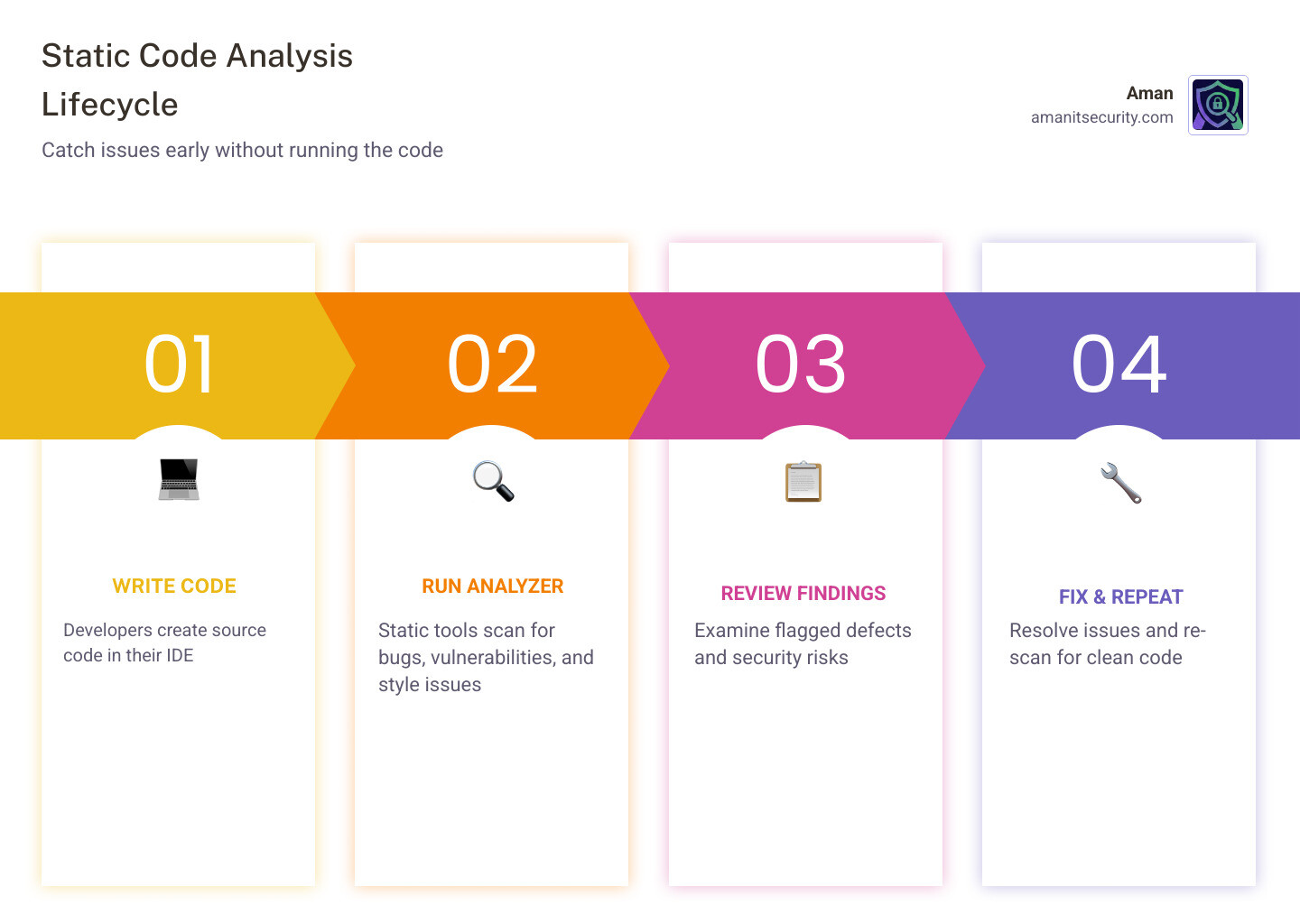
In the world of modern software development, we can’t afford to wait until the end of a six-month cycle to check for security. This is where “shift-left” security comes in. By integrating static analysis into the very beginning of the development process, we catch flaws the moment a developer hits “save.”
In a DevOps environment, this process is automated. Every time a developer commits code, an automated scanner (often called SAST—Static Application Security Testing) reviews the changes. To understand how this fits into the broader security puzzle, check out The Ultimate Guide to SAST vs DAST vs Everything Else.
Core Components Used to Define Static Code Analysis Tools
Not all static analysis tools are created equal. They generally fall into two categories:
- Linters: These are the “style police.” They check for formatting issues, like whether you used tabs or spaces, and flag simple programmatic errors.
- Analyzers: These are the “detectives.” They dig deeper into the logic, looking for complex vulnerabilities and memory leaks.
Most advanced tools use an Abstract Syntax Tree (AST). This is a tree representation of the abstract syntactic structure of source code. By converting code into a tree, the tool can easily traverse the logic to see how data flows from one function to another, making it much more powerful than a simple text search.
Static vs. Dynamic Analysis: Understanding the Differences
The biggest question we get is: “If I’m already doing testing, why do I need static analysis?” The answer lies in the difference between looking at a car’s engine blueprints (static) and taking the car for a test drive (dynamic).
| Feature | Static Analysis | Dynamic Analysis |
|---|---|---|
| Execution | No code execution required | Requires running the program |
| Coverage | Can scan 100% of the code paths | Only scans paths that are executed |
| Timing | Performed early (Create phase) | Performed late (Testing/Prod) |
| Goal | Find structural and logic flaws | Find runtime and environment issues |
Dynamic code analysis identifies defects after execution, which means it can find issues that only happen when the server is under heavy load or when a specific database connection fails. However, dynamic testing is rarely exhaustive. It only tests the paths you tell it to test. Static analysis, on the other hand, looks at every single line, including the “dark corners” of your code that might not be triggered during a standard test run.
Why Static Analysis is More Cost-Effective
We love numbers because they don’t lie. A NIST study on the rising cost of defects shows a staggering exponential growth in repair costs as code moves through the lifecycle.
Furthermore, an IBM study on defect fixing costs found that improving code quality through early static analysis can reduce overall defect-fixing costs by up to 75%. When you catch a bug while the developer is still writing the function, it takes five minutes to fix. If that same bug causes a data breach in production, it could cost your company millions.
The Limitations of Static Testing
We have to be honest: static analysis isn’t magic. It has its hurdles:
- False Positives: Sometimes the tool flags something as a “security risk” that is actually perfectly safe. This can lead to “alert fatigue” where developers start ignoring the tool.
- False Negatives: No tool is perfect. It might miss a complex, multi-step logic flaw.
- Undecidability: Due to the “Halting Problem” in computer science, it is mathematically impossible for a tool to predict every single runtime outcome with 100% certainty.
- Developer Intent: A tool can tell you your code is “valid,” but it can’t tell you if it’s “right.” If you meant to add two numbers but wrote code to subtract them, the static analyzer might see perfectly valid syntax and miss the logical error.
Key Techniques in Static Code Analysis
How do these tools actually “read” code? They use several sophisticated techniques derived from compiler theory:
- Data Flow Analysis: This tracks how data moves through the program. It ensures that variables are initialized before use and that sensitive data (like passwords) doesn’t end up in insecure places (like logs).
- Taint Analysis: This is a security-specific version of data flow analysis. It identifies “tainted” input (user-provided data) and follows it to see if it reaches a “sink” (like a database query) without being cleaned. This is how we stop SQL injection.
- Lexical Analysis: This is the first step, where the tool breaks the code down into “tokens” (keywords, operators, and identifiers) to check for basic syntax violations.
- Control Flow Graphs (CFG): The tool builds a map of all possible paths through the code. As noted by Wögerer, 2005 Basic block and graph representation, these graphs help identify unreachable code or infinite loops.
Complexity and Code Duplication Analysis
Beyond bugs, we use static analysis to measure “code health.”
Cyclomatic Complexity measures how many independent paths exist through your code. If a function has too many if statements and loops, it becomes a nightmare to maintain. High complexity scores are a leading indicator of future bugs.
We also look for Code Duplication. Copy-pasting code might seem fast, but it doubles your technical debt. If a bug exists in the original snippet, it now exists in ten other places, too. Static tools find these duplicates so you can refactor them into a single, reusable function.
Formal Methods and Abstract Interpretation
For mission-critical systems—think medical devices or flight control software—we use “Formal Methods.” These are rigorous mathematical proofs used to verify that a program will behave exactly as intended under all circumstances.
Techniques like Abstract Interpretation allow us to gain information about every possible execution of a program without actually running it. For more on this, the A Survey of Automated Techniques for Formal Software Verification provides a deep dive into how we use math to ensure software safety.
The Business Case for Static Analysis: Security and Compliance
If you are a business leader, the most compelling reason to define static code analysis as a requirement is risk management.
The security benefits are massive. Static analysis is the primary defense against the OWASP Top 10, a list of the most critical web application security risks. It is incredibly effective at catching:
- SQL Injection: Prevent attackers from stealing your database.
- Cross-Site Scripting (XSS): Stop hackers from injecting malicious scripts into your users’ browsers.
- Insecure Cryptography: Ensure your team isn’t using outdated encryption methods.
An IBM study on the cost of data breaches found that the average cost of a breach ranges from $1.25 million to $8.19 million. Static analysis is a very cheap insurance policy against that kind of disaster.
Compliance with MISRA and ISO 26262 Standards
In regulated industries, static analysis isn’t just a “nice to have”—it’s the law. Standards like MISRA (for C/C++) and ISO 26262 (for automotive safety) mandate the use of static analysis to ensure code is reliable and safe.
According to VDC Research on embedded software engineer tool usage, nearly 30% of embedded engineers already use these tools, with adoption growing rapidly as software becomes more central to cars and medical devices.
Supporting ‘Shift Left’ Security Practices
“Shift left” is about moving security from the end of the development cycle to the beginning. This empowers developers to take ownership of their code’s security. By providing instant feedback in the IDE, developers learn to write better code over time. This creates a high Return on Investment (ROI) by fostering a culture of quality. To see how this applies to mobile development, check out How to Implement SAST for Mobile Apps Without Losing Your Mind.
Integrating Static Analysis into Developer Workflows
The secret to successful static analysis is making it invisible. If a tool is hard to use, developers will find a way to skip it.
The best way to integrate is directly into the IDE (Integrated Development Environment). This provides real-time feedback—like a red squiggly line under a typo—but for security vulnerabilities.
The next layer is the CI/CD pipeline. Every time a developer opens a “Pull Request,” the automated scanner should run. If the code doesn’t meet the quality bar, the build is blocked. This ensures that flawed code never even makes it into the main repository. Research in the study Automatic Static Code Analysis Through CI/CD Pipeline Integration suggests that native pipeline support is the single biggest factor in whether a team successfully adopts static analysis.
Best Practices for Effective Implementation
We recommend a few key steps to get your team on board:
- Start Small: Don’t turn on 1,000 rules on day one. You’ll overwhelm your team. Start with the “Critical” security rules and expand from there.
- Rule Customization: Every project is different. Customize your rules to match your specific coding standards and suppress known false positives.
- Incremental Fixes: Don’t try to fix 10 years of “technical debt” in a week. Focus on ensuring all new code is clean, and slowly chip away at the old stuff.
- Team Education: Use the tool’s findings as a teaching moment. Our guide, The Ultimate SAST Vulnerability Fix Guide for Busy Devs, is a great resource for helping devs understand how to fix what the tool finds.
Criteria for Selecting a Static Analysis Tool
When choosing a tool, keep these three criteria in mind:
- Language Support: Does it support the languages your team actually uses? With TypeScript usage surging to 37% and Go adoption rising, you need a tool that stays current.
- Scanning Speed: If a scan takes two hours, it will break your CI/CD pipeline. Look for tools that offer “incremental scanning” to only check what changed.
- Actionable Reporting: A list of 500 errors is useless. You need a tool that prioritizes risks and provides clear fix suggestions. For help choosing, read The Ultimate Guide to Choosing an AI SAST Analysis Tool.
Frequently Asked Questions about Static Code Analysis
When and where in the SDLC should static code analysis be performed?
Ideally, it should happen at multiple stages. It starts in the Implementation phase (right in the developer’s IDE). It then moves to the Create/Build phase of DevOps, where it is triggered by every code commit. Finally, it should be part of nightly builds for a deeper, full-system scan.
What are the main benefits of using static code analysis tools?
The primary benefits include early bug prevention, enforcement of coding consistency, and a significantly improved security posture. Economically, it can lead to a 75% reduction in the cost of fixing defects by catching them before they reach production.
How can static code analysis be integrated into CI/CD pipelines?
Integration is achieved through automated triggers. When a developer pushes code to a repository like GitHub or GitLab, the CI/CD tool (like Jenkins or GitHub Actions) automatically calls the static analysis API. If the code fails predefined “quality gates,” the pipeline stops, providing immediate feedback to the developer.
Conclusion
At Aman Security, we believe that high-quality code shouldn’t be a luxury. We provide AI-powered automated penetration testing, SAST analysis, and vulnerability scanning for both applications and infrastructure.
Our mission is to make the digital world safer by providing blazing-fast, comprehensive scans. We don’t just find the problems; we provide instant AI explanations and actionable fix suggestions so your team can get back to building. Best of all, you can get started with our core scanning features for Free.
Ready to see how clean your code really is? Visit Aman Security today and start your first scan. Let’s build something secure together.
Secure Your Apps with Aman
Put these mitigation steps into practice. Get professional-grade vulnerability detection in one place.
Launch Your First Scan Now